Featured Post

Welcome to our LT130 Assistive Technology Blog!

Welcome to our LT130 Assistive Technology Blog!  What is Assistive Technology? Assistive  (also called  adaptive )  technologies...

Wednesday, April 22, 2020

Libraries and the Digital Divide for People with Disabilities

According to the Organisation for Economic Co‑operation, “The term ‘digital divide’ refers to the gap between individuals, households, businesses and geographic areas at different socio-economic levels with regard to both their opportunities to access information and communication technologies (ICTs) and to their use of the Internet for a wide variety of activities” (OECD, 2006). This divide can be traced to factors across areas of income, education, household size, gender, race, language, and location (OECD, 2006). In a world increasingly dependent on the internet, the digital divide presents a threat to many groups of people that may lead to increased marginalization and exclusion.

People with disabilities are often left behind due to the digital divide. This is especially distressing due to how valuable the internet can be especially for many of these people. Internet communities can be an important source of support for people dealing with similar conditions and struggles, and reliable online sources can be a good way to get information about health and living with disabilities (Vincente and Lopez, p. 49). This is especially distressing considering that the amount of people living with disabilities is expected to rise as the baby boomer generation ages; many conditions, like vision loss and mobility issues are tied to aging (Mates, 2012, p. 9).

The population is trending toward more older adults, who are at higher risk of disability


The reasons for the digital divide often come down to a mixture of socioeconomic, educational, and emotional factors. In a study by María Rosalía Vicente and Ana Jesús Lopez (2010), they note that people with disabilities are often economically challenged due to lack of opportunities for education and work (p.50). Computers, internet access, and additional assistive technology devices cost money. As many digital sources have not been optimized for use by people with disabilities, this presents a barrier to entry that may discourage potential users. According to Vincente and Lopez, these technical barriers cause many people with disabilities to show less interest in online resources than others. While economic factors play a part for many people, even those who can afford digital and assistive technology are just as likely to avoid the internet as those who cannot (Vincente and Lopez, p. 59).

Libraries are a logical source for addressing the barriers in access to digital information technology for people with disabilities. Libraries provide computers, internet access, and informational programming to the public for free. In fact, libraries are both morally obligated and legally required to provide these services: the Americans with Disabilities Act and the Americans with Disabilities Accessibility Guidelines require that public services and programming are accessible to people with disabilities, and the American Library Association has taken a stance of promoting inclusion for all through library services (Mates, 2012, pp. 7-8). The ALA website has a LibGuides page with many resources devoted to disability laws, service procedures, and other ways of promoting equal access.

So what are libraries doing to combat the digital divide and how can they best approach this issue specifically for patrons with disabilities? Digital access and literacy programming, especially targeted toward groups that are less experienced and involved with the internet, would be a good starting point. Some libraries, like the Seattle Public Library, have created WiFi lending programs so that low-income patrons can check out hotspots to use temporarily at home (Webber, 2019). 

Another example of a technology lending program from the Queens Public Library

If libraries can lend WiFi hardware, it would make sense to me that they also might be able to have assistive technology tools they could lend to meet their community needs. As there is intersectionality between people with disabilities and other marginalized groups, libraries must also commit to racial and social equity to fully break down barriers to access and programming (Webber, 2019). As with other disability related services, I can see the importance of community involvement here to make sure that programming is tailored to people with disabilities’s needs and to encourage participation. While I understand that this would be hard for libraries dealing with limited budgets and staff hours, it is extremely necessary for libraries to become involved in bridging the digital divide and empower people with disabilities.

References

American Library Association. (2019, January 17). LibGuides: Library Service to Persons with Disabilities: Home. Retrieved April 22, 
     2020, from https://libguides.ala.org/libservice-disability

Leins, C. (2018, April 26). Wi-Fi Hot Spots Are Getting the Homeless Back on Their Feet. Retrieved April 22, 2020, from 
     https://www.usnews.com/news/best-states/articles/2018-04-26/internet-access-proving-to-be-invaluable-at-homeless-camps

Mates, B. T., & Booth, C. (2012). Information Power to All Patrons. Library Technology Reports, 48(7), 7–13.

OECD Statistics Directorate. (2006, January 4). Digital Divide. Retrieved April 22, 2020, from 
     https://stats.oecd.org/glossary/detail.asp?ID=4719

Queens Library Mobile HotSpots [Video file]. (2015, October 22). Retrieved April 22, 2020, from https://youtu.be/1a5lerKjxLc

US Census. (2018, March 13). An Aging Nation: Projected Number of Children and Older Adults [Digital image]. Retrieved April 22, 
     2020, from https://www.census.gov/library/visualizations/2018/comm/historic-first.html

Vicente, M., & López, A. (2010). A Multidimensional Analysis of the Disability Digital Divide: Some Evidence for Internet Use. 
     Information Society, 26(1), 48–64. https://doi-org.ezproxy.palomar.edu/10.1080/01615440903423245

Webber, S. C. (2019, March 28). The Library's Role in Bridging the Digital Divide. Retrieved April 22, 2020, from 
     https://www.urbanlibraries.org/blog/the-librarys-role-in-bridging-the-digital-divide

  Assistive Technology and Intellectual Disabilities

"Many Americans lack the skills required to use public access computers and the Internet at public libraries. Staff members can help them develop basic computer training skills to support patrons' Internet and public access computer use."  (eric.ed.gov, 2018)
It is important for a librarian to develop skills of their own in order to help provide the correct direction to patrons who may need extra help. First and foremost, ensure patrons with any kind of disabilities you meet (even those you can't see), that they are welcomed, valued, and are equal members of their library community. It isn't difficult to recognize a patron who may not understand the process of using a library computer. The fear and intimidation alone by their surroundings is hard enough, but not knowing how to approach a librarian for help, is just as hard! That fear can be visually obvious on any face young or old, but it can be even more animated with those with learning disabilities. In general, computers can be easy to use, but if you've never used one and have learning difficulties, it can be a incredibly stressful and difficult challenge! Someone has to show them the ropes and libraries must be trained to provide all patrons of any learning levels, the basic needs to start them on the use of library computers.https://skd-1e9a.kxcdn.com/sites/7/2017/07/18145341/banner2.png

Libraries play a crucial role in the lives of people with disabilities by making it easier for them to participate in society by helping them overcome barriers! 


Does your library offer workshops for patrons with learning skills? If not, why not suggest one? If this suggestion takes time, find ways to provide tools until it happens.Staff should be aware that Microsoft’s Windows packages and Vista programs do come with accessibility attributes that can help some persons with moderate disabilities use computers. These accommodations can be found in the Microsoft Ease of Access Center and includes programs such as Sound Sentry which helps hearing-impaired people see audio computer cues while Sticky Keys enables key-combination commands, such as Ctrl-Alt-Delete, to be entered as individual key entries (useful for persons who have limited dexterity). Patrons with visual impairments or learning disabilities may find programs such as the “Magnifier” and “Narrator” helpful. There are many other programs that would be useful for a wide range of patrons with disabilities. Libraries using Apple Mac computers should be aware that Apple also incorporates accessibility in all of their products. There is a wide range of tools available which will help people with learning, visual, hearing, and physical disabilities access information without any cost to the library.

If you haven't been trained on how to approach or train patrons with learning disabilities, the following links may provide and help you become familiar and knowledgeable with skills needed to help others overcome barriers so they can learn, understand, and overcome!

                            Flat People Characters Set With Special Needs Disabled Cartoons ...

Libraries should utilize strategies, resources, and services for the needs of all people!

Organizations

ATSTAR (Assistive Technology: Strategies, Tools, Accommodations & Resources) features free online curriculum for students with disabilities by helping teachers learn to use assistive technology in the classroom.
Assistive Technology Industry Association (ATIA) is the trade association for manufacturers, sellers, and providers of assistive technology. It hosts a useful AT Resources Funding Guide that includes nonprofit, government, and insurance sources for AT funding.
Edutopia Assistive Technology: Resource Roundup is a concise place to find out how to get started with AT, find assistive technology tips and tricks, and learn about Universal Design for Learning.
Open Door World is an ancient but useful compendium of AT organizations.


                 gif clipart images of computer learning collection Computer Clip ...


                                  Useful Links

  • Alliance for Technology Access (ATA) 
    The mission of the ATA is to increase the use of technology by children and adults with disabilities and functional limitations. ATA encourages and facilitates the empowerment of people with disabilities to participate fully in their communities. Through public education, information and referral, capacity building in  community organizations, and advocacy/policy efforts, the ATA enables millions of people to live, learn, work, define their futures, and achieve their dreams.
  • Closing the Gap
    Includes information about the Closing the Gap Conference and Newspaper dedicated to the use of computer technology for people with disabilities. Contains a searchable resource directory, information from the field, and a multiple resources. 
  • California State University at Northridge Center on Disabilities (CSUN) 
    The site provides information on the CSUN Conference and Assistive Technology Training and multiple resources pertaining to technology and services to individuals with disabilities.
  • Family Center on Technology and Disability (FCTD)
    The FCTD web site provides thousands of assistive and instructional technology resources of interest to families of children with disabilities. The website offers access to fact sheets, Power Point presentations, monthly newsletters, online discussion and summer institute transcripts, a database of more than 3,500 organizations, a resource review database with hundreds of reviews of AT resources and more. Through the site users can also access FCTD Family Information Guides as well as resources in Spanish.
  • Technology and Media Division CEC (TAM) 
    The purpose of TAM is to support educational participation and improved results for individuals with disabilities and diverse learning needs through the selection, acquisition, and use of technology. The secondary purpose is to provide services to members and other units of CEC, to federal, state, and local education agencies, and to business and industry regarding the current and future uses of technology and media with individuals with exceptionalities.
Resources:
Lonzo, Lavonia, Adult Public Library Patrons' Perceptions of an Academic Library E-Learning Resource, https://eric.ed.gov/?q=+library+patrons+who+have+disabilities&id=ED586700
QIAT, https://www.qiat.org/useful-links.html, 2020

Assistive Technology for the Blind: inspired by a blind ten-year-old boy who wanted to read!

"Developing braille literacy skills represents one of the major goals of the education process for students with vision impairment. Fluency and accuracy in reading and writing facilitate access to information, development of knowledge, active participation, functionality, and independence in social contexts. One of the essential factors that can influence the success in the learning process of the braille code consists of the competences of teachers of students with vision impairment who teach braille."(eric.ed.gov, 2019)

Close your eyes and imagine living in a world without sight, living while depending on others for help. I remember when I was a youngster, my fourth-grade teacher had us all cover our eyes with our handmade paper-eye masks as she read The Miracle Worker to us. Then we all took turns reading in intervals while the rest had our eyes shielded and imagining what it would be like to be without sight!

"There was a time when most people thought that blind people could never learn to read.  A 10-year-old French boy named Louis Braille thought otherwise. Blind from the age of three, young Louis desperately wanted to read. He realized the vast world of thought and ideas that was locked out to him because of his disability. And he was determined to find the key to this door for himself, and for all other blind persons. Inspired by an alphabet code that was being used by the French army, Louis got hold of some of this code, tried it out, and knew that he could improve this alphabet in some way.  Louis sat down to think about how he could improve the system of dots and dashes, and although he liked the idea of the raised dots, wanted to do without the raised dashes. The next few days were spent working on an alphabet made up entirely of six dots. The position of the different dots would represent the different letters of the alphabet. Louis used the blunt awl to punch out a sentence. He read it quickly from left to right. Everything made sense. It worked!" (Inspiremykids.com, 2020)

 The Braille Alphabet invented by Louis Braille, 10 years old, 1824


Louis Braille's invention continues to inspire new and innovative technology that helps build a world that is more inclusive for people with disabilities. 

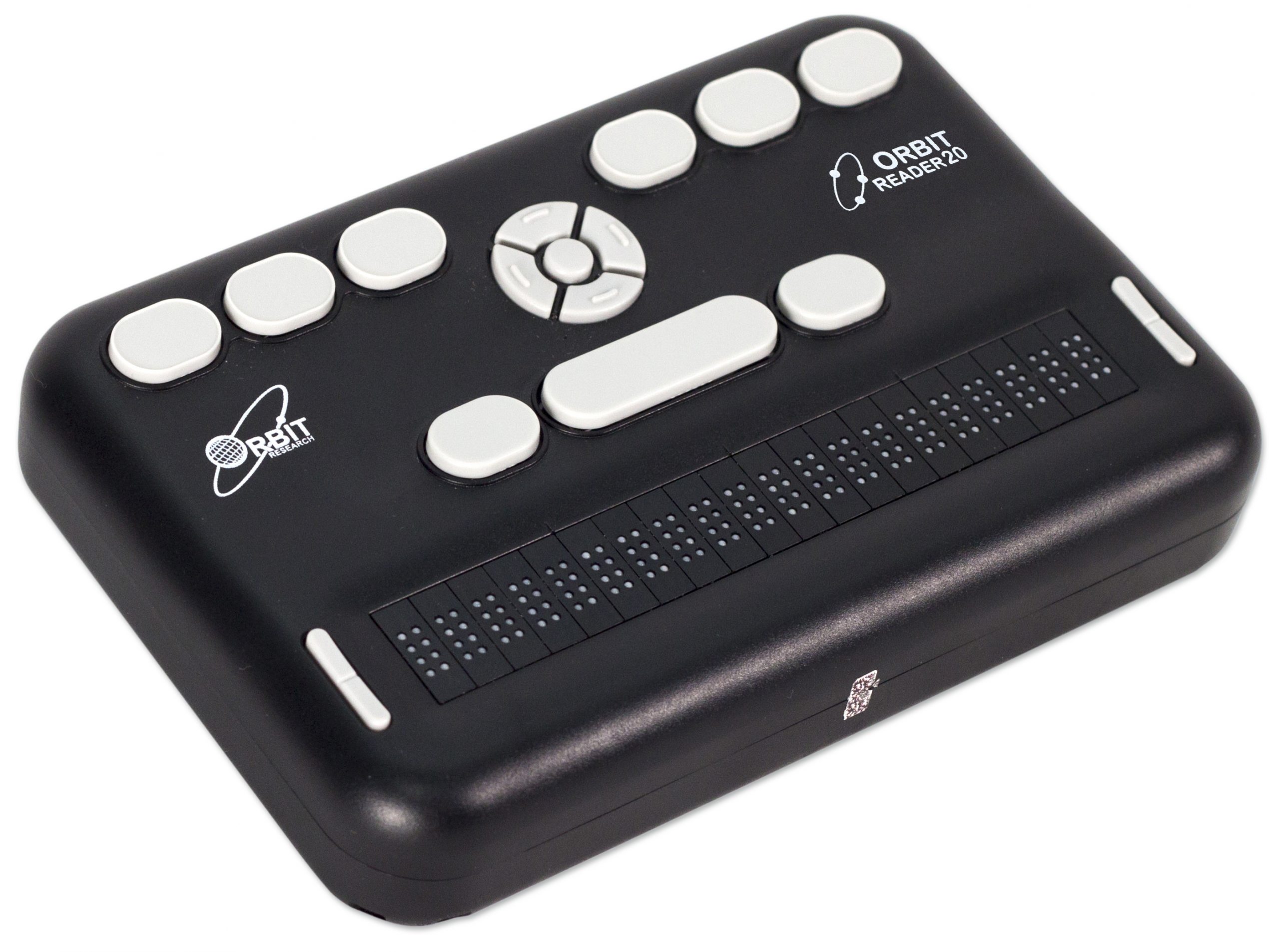
All network libraries provide access to NLS(National Library Service for the Blind)-produced braille and talking books, and many include Refreshable Braille Displays which are extremely useful assistive technology device that stems from the Braille alphabet!
                   
 Refreshable Braille Display Models are not inexpensive! The models below are excessive in cost but things are getting brighter as a new line of inexpensive and models were introduced this year!!! These devices are needed in libraries around the United States and associations, such as the NLS, are coming close to successfully accessing government funding for libraries to have access to these devices! These new models will help libraries access refreshable braille displays affordable to all libraries!       

                        Refreshable Braille Displays

Refreshable Braille Displays provide access to information on a computer screen by electronically raising and lowering different combinations of pins in braille cells. The braille display sits on the user's desk, often underneath the computer keyboard.  These displays help patrons learn to use these displays which can help determine which they can choose to purchase for themselves. The advantages of braille displays over synthetic speech are that it provides direct access to information; allows the user to check format, spacing, and spelling; and is quiet. The price of braille displays range from $3,500 to $15,000, depending on the number of characters displayed. Later models of braille displays offer notetaking and file storage capabilities. Some personal digital assistants (PDAs) may be connected to a computer and used as a braille display or speech synthesizer.

             How Refreshable Braille Displays Work

  
 Good news clipart » Clipart Station

     Good news for libraries with limited budgets.


National Library Service for the Blind and Physically Handicapped to Expand Braille Service

Fingers reading braille

Braille and Talking Book Library

Thanks to U.S. Senate Bill 3207, passed by the House and Senate in July, service for Braille and Taking Book Library patrons will expand in the near future.
The bill, introduced by Senator Chuck Schumer (D-NY), amends existing law to generalize the types of equipment that can legally be purchased, maintained, and replaced for library patrons through the National Library Service for the Blind and Physically Handicapped (NLS). This essentially allows NLS to use future funding on refreshable electronic braille displays for patrons.  As the NLS slogan goes, "So That All May Read."       

          Orbit Research 


                  Orbit Research Introduces the World’s Most Affordable 40-cell Braille Display

The full-featured Orbit Reader 40 offers the highest quality braille at a price that is a fraction of the cost of similar devices
                           Anaheim, California – March 11, 2020 –
Orbit Research announced the launch of the Orbit Reader 40 refreshable braille display and notetaker today at the 35th annual CSUN Assistive Technology Conference.  It is the world’s most affordable, full-feature 40-cell braille device, priced at a fraction of the cost of similar devices. Based on the revolutionary Tactuator™ braille technology from Orbit Research, the Orbit Reader 40 provides signage-quality braille in a compact hand-held device with 40 eight-dot braille cells with cursor routing keys and a Perkins-style braille keyboard.
                                                 
                                          High-cost Refreshable Braille Display Models
  • ALVA BC680: Compact 80-cell braille display designed to work with a variety of products including PCs, Apple computers, mobile phones and PDAs. Includes Bluetooth and USB connectivity and built-in Windows access utility. The ALVA BC680 is like having two braille displays in one device. It's the only 80-cell braille display that offers simultaneous connectivity with two PCs/Macs. Or you can connect one PC/Mac and a Smartphone.
  • Braille Wave: Forty-character braille display with a built-in notetaker. May be connected to a notebook computer. Software package supplied allows notes to be easily transferred to Microsoft Word on a personal computer. Can be connected to a computer through either a serial cable or Bluetooth (optional).
  • Brailliant B 80: Small, light and compact display for use with desktop or laptop computers. Offers both Bluetooth and USB connectivity.
  • Easy Braille: Forty-cell braille display with USB or optional Bluetooth connection. The braille display is concave, so the user's fingers fall directly on the braille characters.
Resources:

Undergraduate Student Education Programs Regarding Braille Literacy, https://files.eric.ed.gov/fulltext/EJ1230765.pdf  Argyropoulos, Vassilios; Hathazi, Andrea; Nikolaraizi, Magda. Higher Education Studies, v9 n4 p44-57 2019
Inspire My Kids, Louis Braille – While Just A Teen, He Became a Pioneer for the Blind! https://inspiremykids.com/2015/louis-braille-while-just-a-teen-he-became-a-pioneer-for-the-blind/
American Federation for the Blind, Refreshable Braille Displays, https://www.afb.org/node/16207/refreshable-braille-displays
What is a braille display tactile electronic display for the blind, https://www.youtube.com/watch?v=GxiMUnJVLDM

  Assistive Technology for Visual Impairments 

Many years ago, I was my mother's reading eyes when hers began to fail due to diabetes macular degeneration. This was years prior to the advancement of technology and the introduction of the many devices that are so valuable many today.
 
"Bruce Groendyke, a severely nearsighted Army vet from Hightstown, New Jersey, says he’s a “technical dinosaur.” But as one of many veterans who attended a recent class held by New Jersey State Library’s Talking Book and Braille Center, he learned how to use the assistive technology features on an iPad. Libraries nation­wide have been joining forces with state agencies to improve their patrons’ access to assistive technol­ogy. Through a partnership with New Jersey Commission for the Blind and Visually Impaired are providing acces­sibility programs for patrons with visual impairments." (AL, 2017)

Bruce is one of thousands who have or are facing macular and visual degeneration in the United States. From the very young to the older generation with visual impairments, more are seeking help and relying to our public libraries to help with the latest in technology!

                                    Read2Go

                                        What is it and how it can benefit the Visually impaired?
                 Read2Go corresponds with Bookshare, a digital library that makes books available
                   to anyone with  reading-related disabilities such as dyslexia and vision issues:

                                         Accessing BookShare with Read2Go on Apple iOS


                             Simple, Fast, Easy

Read2Go is an accessible ebook reader app that lets you read Bookshare books with ease on the iPad, iPhone, and iPod touch.
With Read2Go, you can find and read Bookshare books on a single Apple device. Just find the book you want, download, and start reading. Read2Go lets you customize your reading experience in many different ways:
  • Listen to words read aloud with Acapela voices (Heather or Ryan)
  • See and hear words as they are highlighted
  • Connect and read with a braille display
  • Enlarge font sizes
  • Adjust colors and reading speeds and more!
 Audiences include:
  • Blindness: Read aloud with Heather or Ryan voices, navigation integrated with VoiceOver text-to-speech (TTS)
  • Low Vision: Heather or Ryan voices, plus large font options, background, text and highlighting color options
  • Learning Disability: Word-level highlighting plus Heather or Ryan voices
  • Physical Disability: Switch-compatible
Library patrons of all ages with visual disabilities can benefit from Read2Go and the many assistive technology devices that not only opens doors to those with disabilities but gives confidence and much needed independence!

Resources:

Marcotte Ai. Bringing Assistive Technology to Patrons. American Libraries. 2017;48(1/2):24-25.  http://search.ebscohost.com.ezproxy.palomar.edu                                                            
Read2Go, https://www.youtube.com/watch?v=rsuIJXVDAI8                                           
Accessing BookShare with Read2Go on Apple iOS, https://www.youtube.com/watch?v=1hPcXzZW9pc


Sunday, April 19, 2020

Libraries and Other Assistive Technology

In my last blog post, I gave some examples of ways libraries can incorporate mobile devices as assistive technology in order to support patrons with disabilities. This time, I decided to look at more resources and strategies for implementation that don’t necessarily relate to mobile technology.

Again, I think it is important to stress the necessity of libraries in providing assistive technology to their communities. In an article I read by Christopher Guder (2012), a librarian at Ohio University and ADA specialist, he mentions that a student told him that the library was “the only place on campus where people, like me, with learning disabilities or physical disabilities can find the computer programs that are necessary to be successful in the academic world. It is no exaggeration that my success would be impossible without this room (Guder, 2012, p. 14). The same is true of many communities, in which services are not necessarily designed with people with disabilities in mind.

Fortunately, there are options for libraries to fill this gap in access. In my past post, I mentioned the use of screen readers through mobile technology as an alternate means for people with disabilities to interact with devices. A common screen reading tool used in libraries is JAWS (Job Access With Speech) on Windows. It translates text into either audio or braille output. In addition to screen reading, it also provides users with difficulty using a mouse alternative ways of navigating electronic content through keystrokes.

Another screen reader with expanded functionality is ZoomText Magnifier/Reader. As the name suggests, it provides both screen magnification and reading features. In addition to providing different magnification options, ZoomText converts text into sound files that can be saved and played back later on computers and mobile devices. This added functionality makes it another popular accessible technology product for libraries.


ZoomText in action

A number of other recommended assistive technology items and links and their uses can be found on this ALA webpage.

In addition to software, physical and hardware changes can also be made to better support people with disabilities (Guder, 2012, p. 17). Equipping library computer with large monitors for magnification and headphones for screen reading software can make a big difference for users of assistive technology. Braille embossers are also a good resource for people living with blindness to take with them materials they have created with library computers. In addition to more electronic considerations, desks should have adjustable heights for wheelchair users or other people who may need different amounts of space. It is also a good idea to have these resources within distance of library staff who can assist patrons as needed. Guder suggests placing these resources near service desks or at least some sort of staff notification tool. Some libraries even create dedicated rooms devoted to assistive technology and assistive technology trained staff. For example, the San Diego Public Library central location has the OliverMcMillan I CAN! Center located on the first floor. Though dedicated centers may not be an option for all libraries due to funding and space concerns, this can be a good way to give patrons with disability privacy, as well as allow them to adjust the room lighting and other conditions to their needs (Guder, 2012, p. 17).

An example of a library Assistive Technology Center


I found it very interesting to learn about these resources. In his article, Guder (2012) notes that marketing these resources is also an important step in making sure people with disabilities know that the library can serve their needs. This includes making connections through local groups centered around disability awareness and advocacy, as well as through communication like websites, email, and videos. I have never noticed them at my local library branches, and am definitely going to keep an eye out for them in future visits and when reading emails.

Resources

ASGCLA. (2019, September 05). Assistive Technology: What You Need to Know Library. Retrieved April 19, 2020, from 
     http://www.ala.org/asgcla/resources/tipsheets/assistive-technologies

Bove, D. (Director). (2010, July 29). ZoomText Magnifier/Reader [Video file]. Retrieved from https://www.youtube.com/watch?
     v=htJ5jZnk6ZQ

Freedom Scientific. (n.d.). JAWS®. Retrieved April 19, 2020, from https://www.freedomscientific.com/Products/software/JAWS/

Guder, C. S., & Booth, C. (2012). Making the Right Decisions about Assistive Technology in Your Library. Library Technology Reports
     48(7), 14.

San Diego Public Library. (n.d.). OliverMcMillan I CAN! Center. Retrieved April 19, 2020, from https://www.sandiego.gov/public-
     library/central-library/i-can-center

UBC Okanagan (Director). (2015, October 21). Inclusive Technology Lab at the Library [Video file]. Retrieved from 
     https://www.youtube.com/watch?v=ipD7nEOYus4

Saturday, April 18, 2020

Using Mobile Devices to Support People with Disabilities

Mobile devices like tablets, eReaders, and smartphones are both easy to carry and can access a variety of information through the internet. This includes ebooks, which have become included in the collections of many libraries. However, the options between formats and compatibility with different devices can make considering electronic resources a complicated task for some library staff.

Despite this potential for confusion, it is very important for library staff to take resources for mobile technology seriously. What makes these devices especially important is their potential as assistive technology for people with disabilities. According to Nicole Hennig (2016), a user experience professional with a career of helping libraries effectively use mobile technologies, this is accomplished through the use of Natural User Interfaces, also known as NUIs. NUIs are designed to be more intuitive than traditional Graphic User Interfaces through their incorporation of recognizing different inputs, such as sound, touch, and sight. These features include touchscreens, voice commands, and the ability to recognize images through a camera. Allowing for a variety of ways to work a device can allow for people with disabilities to access beneficial resources through technology. For example, Hennig mentions the story of a man named Todd living with a spinal injury who was empowered through the use of Siri on iPhone, as well as a Tecla Shield device that allows him to control devices through touch using his chin and mouth.

Like in Todd's story, Tecla Shield device allows for touchscreen accessibility

As well as allowing for different methods of input, mobile technology can also offer different accessible outputs. Common forms are screen magnification for people with vision difficulties, screen readers to assist in or replace visual reading, and even braille options through the use of devices like refreshable braille displays. Hennig gives an example of this technology in action through a seventh grader named Connor, who lives with cerebral palsy. Instead of relying on his mother to read to him, Connor was able to use a service called Bookshare. The ebooks read the story aloud, highlighting the words as they reach them to help users follow along. Services like Bookshare can have learning benefits for a wide variety of people, and would be great resources for librarians to refer to patrons.

From these examples, mobile technologies and compatible assistive technology software and devices are clearly extremely important for serving patrons with disabilities. When looking into the formats though, it was clear to me that there wasn’t a “one size fits all” option for libraries. Ranti Junus (2012), a systems librarian at Michigan State University, notes that file types can provide compatibility issues for different devices. Some ebooks, like those on Kindle or Nook, are made by companies so that they will not run on their competitors’ devices. These proprietary formats are less useful than open format files, like EPUB, TXT, or HTML. A particularly valuable specialized format is DAISY, a digital text book platform that can be read using DAISY devices or apps on mobile devices like tablets and smartphones. Designed for people with print disabilities, it allows users to easily navigate content and listen to text and descriptions of pictures.

This chart from Junus's article shows which formats are compatible with which devices

It seems to me like the best course of option for libraries is to first become aware of people with disabilities in their communities. Since different options support people through different means, choosing the best option relies of meeting patron needs. Since investing in a variety of different platforms and devices can be costly, I would consider which options meet the needs of the community most efficiently. It’s important to keep in mind that people with disabilities aren’t in need of “fixing” to access information in the same ways as others, but deserve the chance to use library resources in ways that support them. Assistive technology should be used to empower, not to other or try to “fix” people such as those in the autism and deaf communities (Hennig, 2016, p. 7). For this reason, I would suggest for libraries to consult with their patrons about their needs when considering the options for mobile based assistive technology. It is well worth the investment to make sure that libraries are able to serve whole communities and function as inclusive community spaces.


References

Bookshare. (2020). Retrieved April 18, 2020, from https://www.bookshare.org/cms/

The Daisy Consortium. (2020). DAISY Format. Retrieved April 18, 2020, from https://daisy.org/activities/standards/daisy/

Hennig, N. (2016). Mobile Learning Trends: Accessibility, Ecosystems, Content Creation. Library Technology Reports, 52(3), 1–38.

Junus, S. G. R., & Booth, C. (2012). E-books and E-readers for Users with Print Disabilities. Library Technology Reports, 48(7), 22–
     28.

Tecla. (2015, April 10). Meet the Tecla Shield - How it Works. Retrieved April 18, 2020, from https://www.youtube.com/watch?
     v=cn41GhTDe4M

Friday, April 17, 2020

How Does Google Books Serve People with Visual Disabilities?

One of the largest digital libraries is Google Books. Google books representatives describe the site as a means to “organize the world’s information and make it universally accessible and useful” (Jones, 2019, p. 252). To some degree, this is certainly true: the site provides full text copies of public domain works, previews of in-copyright books, as well as reviews, related books, other access through stores and libraries, and searching features. However, going into my investigation, I had doubts as to how Google books would be able to specifically benefit people with visual difficulties or blindness.

Google Books Item Overview

Before talking about the current state of Google Books and inclusion, it helps to look back to see how digital libraries have developed and taken cues from public libraries throughout history.

In her 2017 article, information researcher Elisabeth Jones draws parallels between the Public Library movement beginning in the 19th Century and the Digital Library Movement that began in the nineties and continues today. Both movements express the value of increased access to information and the ability of people to inform themselves to aim for self-betterment. While these goals are admirable, both movements had major limitations due to exclusionary practices. Early public libraries were largely supported by wealthy philanthropists, like Andrew Carnegie, aimed toward serving the working, middle class. This group was largely perceived as socio-economically homogenous by public library advocates. In their minds, library users they considered “other” would be guided by the library toward adopting similar views and habits in addition to economic growth. 


Philanthropist Andrew Carnegie (Photograph from Encyclopaedia Britannica)

Unfortunately, the Digital Library Movement began in a similar fashion, serving narrow groups of people as opposed to society as a whole. Originally, the movement was driven by computer scientists. As such, more effort was placed into the technical system creation aspects as opposed to providing mainstream access. As universities became more involved in the movement, they brought with them an increased focus on increasing access to information, like public libraries idealized. However, the movement was still being run by a group of academics and not the general public.

The kind of mindsets that had driven the early Public Library and Digital Library Movements is very likely to exclude people who are not highly represented in their communities. I would suspect that this includes people with disabilities. With this in mind, I started researching Google Books to see if this kind of exclusion would still be reflected in the most current and mainstream digital library platform.

According to the Association of Specialized, Government and Cooperative Library Agencies, a division of the American Library Association, there are a few common ways to increase accessibility for patrons with disabilities. One example is a way to magnify the text, which can be useful for users with visual difficulties or learning difficulties. Fortunately, Google Books has the feature to zoom in and out. 

Zoom tools help make displayed text more accessible

However, for users with more severe difficulties or blindness, this feature will not provide full access. Reading through ALA recommendations, I learned that screen readers were another major way of making print accessible on computers. According to information from the National Federation of the Blind, Google actually implemented support for screen readers as far back as 2007. While the functionality is largely hidden to users without assistive technology installed in their computer, the site reveals a link to a compatible text-based eBook when it detects certain software.

As of 2007, there was still a major shortcoming in the ability of blind users to access downloadable off-line copies of books. Since Google Books downloads many documents as PDF images, many of them are not compatible with screen readers relying on text recognition. However, Google Books pages have been linked to downloadable eBook versions in recent years. These downloads can be read using accessibility features on devices like Kindles and Apple products. This does not provide an ideal situation for offline reading since other devices and transactions through unaffiliated websites are required. It does, at least, provide a work-around for those fortunate enough to have those devices.

I came away from this investigation surprised. Though by no means is its service perfect, Google has taken concrete steps over the years to increase access, including requesting input from users with disabilities through accessibility forums. This digital library seem to be following in similar footsteps as Public Libraries in expanding access through assistive technology. While both public and digital libraries may have begun with somewhat exclusionary practices, there seems to be hope for the future as long as advocacy efforts continue and people with disabilities are included in technology development.

References

Accessibility. (n.d.). Retrieved April 17, 2020, from https://www.apple.com/accessibility/

Accessibility for Kindle. (n.d.). Retrieved April 17, 2020, from https://www.amazon.com/b?ie=UTF8&node=14100715011

"Assistive Technology: What You Need to Know Library", American Library Association, September 21, 2015.
     http://www.ala.org/asgcla/resources/tipsheets/assistive-technologies (Accessed April 17, 2020) Document ID: 9ab48572-8954-    
     1964-ed5a-8875365fdf4a

Carnegie, Andrew [Image]. Retrieved April 17, 2020, from https://www.britannica.com/biography/Andrew- 
     Carnegie#/media/1/96298/96740.

Connect With an Accessible Community. (n.d.) Retrieved April 17, 2020, from 
     https://support.google.com/accessibility/answer/9248846?hl=en

The Editors of Encyclopædia Britannica (2020). Andrew Carnegie. Encyclopaedia Britannica, Retrieved April 17, 2020, from 
     https://www.britannica.com/biography/Andrew-Carnegie

Google Books. (n.d.). Retrieved April 17, 2020, from http://books.google.com/

Kerscher, G. (2007, November). First Step in Adding Accessibility to Google Books: Was It Enough? Retrieved April 17, 2020, from  
     https://www.nfb.org/images/nfb/publications/bm/bm07/bm0710/bm071003.htm

Jones, E. (2017). The Public Library Movement, the Digital Library Movement, and the Large-Scale Digitization Initiative: 
     Assumptions, Intentions, and the Role of the Public. Information & Culture: A Journal of History 52(2), 229-263. 
     doi:10.1353/lac.2017.0009.